


People already use AI tools to understand content faster. They copy links into ChatGPT. They ask Perplexity to summarize articles. They paste pages into Claude to pull out key ideas.
We decided to meet that behavior where it already exists.
That’s why we built PromptThis a lightweight WordPress block that gives visitors a smarter next step after (or before) reading your content.
Think social sharing buttons, but for AI, with a “prompt engineering” assist.
Example #1 with prompt: Summarize this article
What Is PromptThis?
PromptThis is a custom WordPress Gutenberg block that adds simple AI prompt buttons to your content.
With one click, your website visitors can add your content TO THEIR OWN AI using these AI tools:
- ChatGPT
- Perplexity
- Claude
Each button opens the selected AI platform in a new tab, with:
- Your page URL included
- A pre-written prompt that you choose for your visitor (for example, “Summarize this page” or “What are the key takeaways?” or even more powerful with a prompt like “Review this article and tell me how it might be relevant to my business and list possible next steps”)
Example #2 with prompt: “Review this article and tell me how it might be relevant to my business and list possible next steps“
The Real Value: AI Familiarity
The value of PromptThis is simple and durable:
it helps your content become part of a person’s personal AI context.
AI systems increasingly respond based on:
- What a user has interacted with before
- Which sources they’ve asked about
- What domains appear repeatedly in their prompts
When someone actively summarizes, questions, or explores your content through AI, your site becomes part of their personal AI memory.
Click the PromptThis buttons below for another practical example with even more context added:
Example #3 with prompt “Generate clear, real-world use cases for the “PromptThis” WordPress block. Focus on business value, user intent, and decision-making moments not technical implementation.“
How it works
PromptThis is a WordPress Gutenberg block.
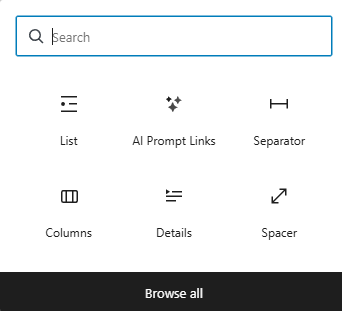
Once you add it you get an assortment of styling options (you’ve already seen a few in this blog post).
And you get the ability to customize the prompt that gets sent over with the article link. We recommend that you focus on what your visitor would like to do specifically with your content (you are giving them an assist with a bit of prompt engineering!)
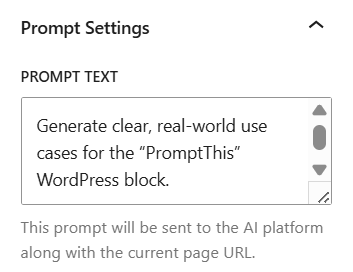
That’s it. Once the prompt is set, the block handles the rest. You control how your content is introduced inside your visitors own AI tools.
Frequently Asked Questions (FAQs)
PromptThis is a custom WordPress Gutenberg block that adds AI “prompt buttons” to a page. When someone clicks, it opens an AI tool (like ChatGPT, Perplexity, or Claude) with your page URL plus a pre-written prompt, so visitors can summarize or analyze your content faster.
PromptThis removes friction. Instead of copying your link into an AI tool manually, a visitor clicks one button and gets an AI tab opened with your URL and a prompt you chose (like “Summarize this page” or “List key takeaways”). It helps visitors get clarity quickly without leaving the context of your site.
The best prompts match what a visitor is trying to do next: summarize, extract key points, compare options, or decide on next steps. Prompts like “Summarize this page,” “What are the key takeaways?” or “How might this apply to my business and what should I do next?” are clear and consistently useful.
PromptThis helps your domain show up more often inside real user prompts, because people interact with your content directly in tools like ChatGPT, Perplexity, and Claude. Over time, repeated interactions can increase familiarity with your site in a user’s personal AI usage patterns, which supports GEO-style visibility in practice.
PromptThis is positioned as a custom Gutenberg block. Once it’s added to a page, you get styling options and you can customize the prompt text that gets sent with the page link. The block handles opening the chosen AI platform in a new tab with your URL and prompt included.
Next Step: Want this on your site?
PromptThis is available as a custom block. If you’re interested in adding it to your site or want to discuss whether it’s a good fit, get in touch, we’re happy to help!